U
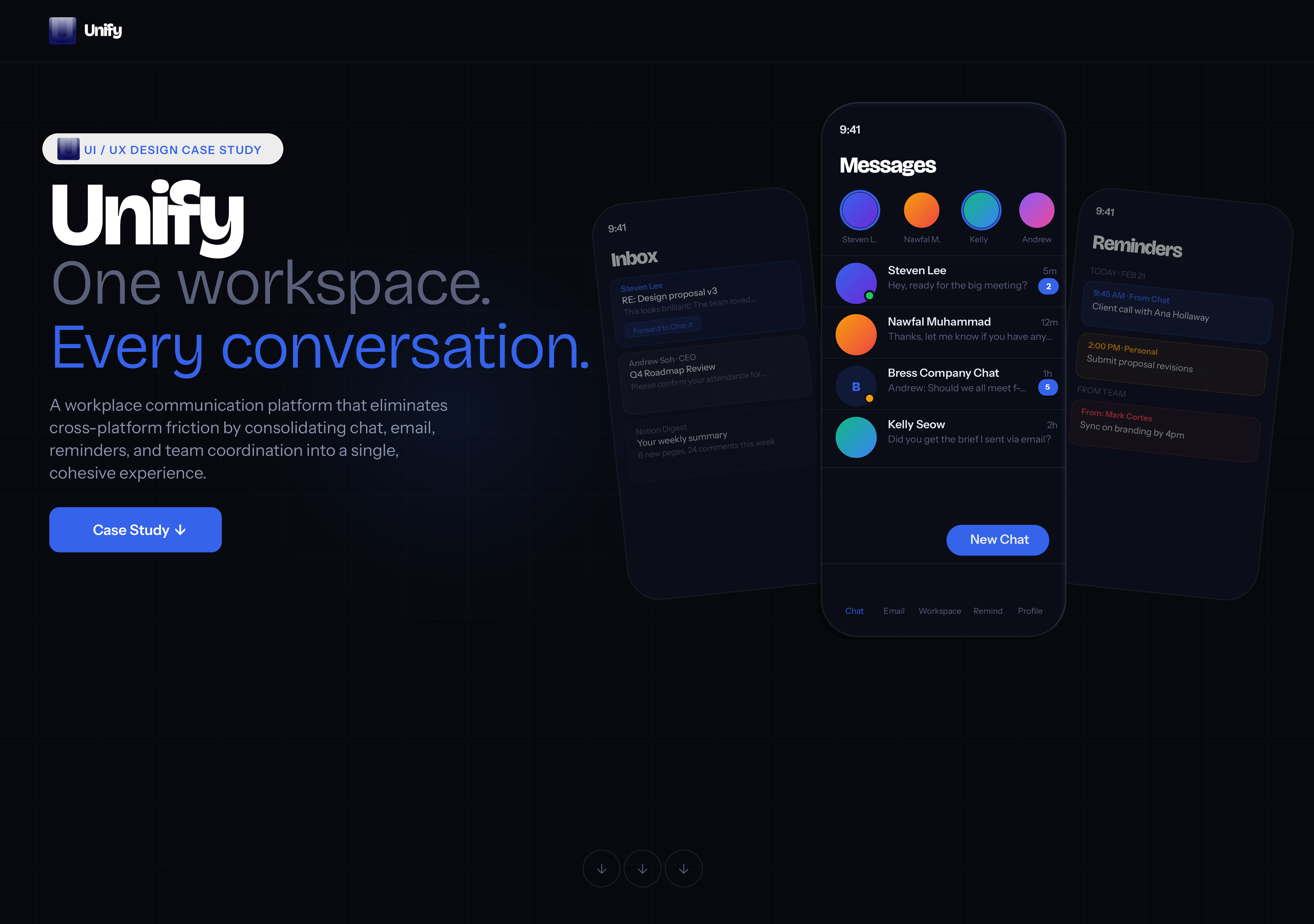
UI / UX Design Case Study
New message
Steven Lee · Hey, ready for the meeting?
9:41 ▪▪▪ ⚡
Inbox
Steven Lee
RE: Design proposal v3
This looks brilliant! The team loved...
Forward to Chat ↑
Andrew Soh · CEO
Q4 Roadmap Review
Please confirm your attendance for...
Notion Digest
Your weekly summary
6 new pages, 24 comments this week
9:41 ▪▪▪ ⚡
Messages
Steven L.
Nawfal M.
Kelly
Andrew
Steven Lee 5m
Hey, ready for the big meeting?
2
Nawfal Muhammad 12m
Thanks, let me know if you have any...
B
Bress Company Chat 1h
Andrew: Should we all meet f...
6
Kelly Seow 2h
Did you get the brief I sent via email?
New Chat
Chat Email Workspace Remind Profile
9:41 ▪▪▪ ⚡
Reminders
Today · Feb 21
9:45 AM · From Chat
Client call with Ana Hollaway
2:00 PM · Personal
Submit proposal revisions
From Team
From: Mark Cortes
Sync on branding by 4pm
UI / UX Design Case Study

UNIFY

Type
Product Design
Duration
2 Weeks
Role
UI/UX Designer
Tools
Figma · Illustrator · After Effects

A workplace communication platform that eliminates cross-platform friction by consolidating chat, email, reminders, and team coordination into a single, cohesive experience. This UI/UX case study covers the full design process: from user research and persona development through a final User experience Prototype -> for a product built to fix workplace communication.

▶
Click to play
✕
Unify — Project Overview
◻
Section 00

Project Overview

assets/projects/unify/overview.jpg · Recommended 6000 × 4001 px

00 Project Overview
The Core Problem

Communication is
broken at work

88%
of the workweek is now spent communicating across fragmented channels
84%
of business leaders are communicating in more channels than ever before
$9.3k
lost per worker annually due to poor communication through multiple channels
Problem

Fragmentation kills focus

Slack. Teams. Gmail. Notion. Zoom. Users switch contexts 4-6x per hour: critical decisions get buried, priorities disappear between apps.

Solution

One ecosystem, zero friction

Chat, email, reminders, and org in one shared workspace. Forward an email into a chat thread. Create a reminder from a message. Less switching. One Direct Channel.

User Research : Personas

Who Unify is
designed for

These are three featured personas built from common profiles across team leads, managers, and workers that communicate in corporate. [Management and platform issues are not mutually exclusive]

Sarah Mitchell
Sarah Tan
Project Manager

Manages 4 cross-functional teams. Constantly juggling Slack, email, and Asana. Her day is reactive, borderline chaotic.

▲Switching 3+ messaging tools daily
▲Some decisions missed in email threads
▲Reminders split across 3 apps
▲No single source of truth for follow-ups
James Okoye
Jason Lim
Startup Founder

Runs a 12 person startup where time is a scarcity. Needs alignment without office tooling overhead. Every minute counts.

▲Too many platforms for a lean budget
▲Critical talk split across Slack & Gmail
▲External emails get lost, follow-ups missed
▲scattered attention across teams
Priya Sharma
Priya Sharma
Remote Employee

Senior designer across 3 time zones. Async-first but constantly misses contextually important updates scattered across tools.

▲Notifications scattered across 4 apps
▲Action items from emails buried & forgotten
▲No thread linking chat to source email
▲Missed assets requires revisiting read emails
Competitive Analysis

How Unify stacks up
against the field

Feature
Slack
Slack
Teams
Teams
Gmail
Gmail
Notion
Notion
Unify
Unify
Real-time team chat●●○○●
Integrated email client○●●○●
Email-to-chat forwarding○○○○●
Smart reminders + threading○●○●●
Shared team reminders○○○○●
Company directory●●○●●
Unified cross-tool search●●●●●
Role-based visibility controls○●●●●
Feature Architecture

Everything your team
needs in one place

4 deeply interconnected core modules:

Unified Messaging

Real-time chat with full threading, reactions, read receipts, and intelligent notification grouping.

🧵
Threaded Conversations
Inline reply threads inside any chat or group
🔔
Smart Notifications
Grouped, prioritized, silenceable alerts
📌
Pinned Messages
Bookmark critical messages for team reference
🔍
Unified Search
Search messages, emails and reminders in one query

Integrated Email

A full email client inside Unify: Connected to your work identity, bridged directly into team chats.

📬
Unified Inbox
All accounts in one view with labels and filters
↗
Email-to-Chat Forward
Forward emails into chat threads with context preserved
🎭
Sender Aliases
Send as your department, role, or personal identity
↩
Inline Replies
Reply to emails without leaving your current conversation

Smart Reminders

Reminders that live inside your conversations: Created from messages, shared with teammates, threaded for discussion.

⏰
Personal Reminders
Time and event-based triggers tied to your workflow
📤
Shared Team Reminders
Assign reminders to coworkers or broadcast to a team
💬
Reminder Threads
Attach a discussion thread to any reminder for context
⚡
Create from Message
Long-press any chat or email to set a follow-up reminder

People & Organisation

A live company directory that respects hierarchy, surfaces the right people, and stays context-aware.

📋
Company Directory
Browse colleagues by name, role, department, or location
🗂
Teams & Departments
Structured org groups with shared channels and reminders
🔒
Role-Based Visibility
Admins control what each role can see and administer
⚡
Quick Contact Actions
Message, email, or set a reminder from any profile in one tap
UI Screen Designs

User Interface screens
across every module

Final web and app UI across all product surfaces:
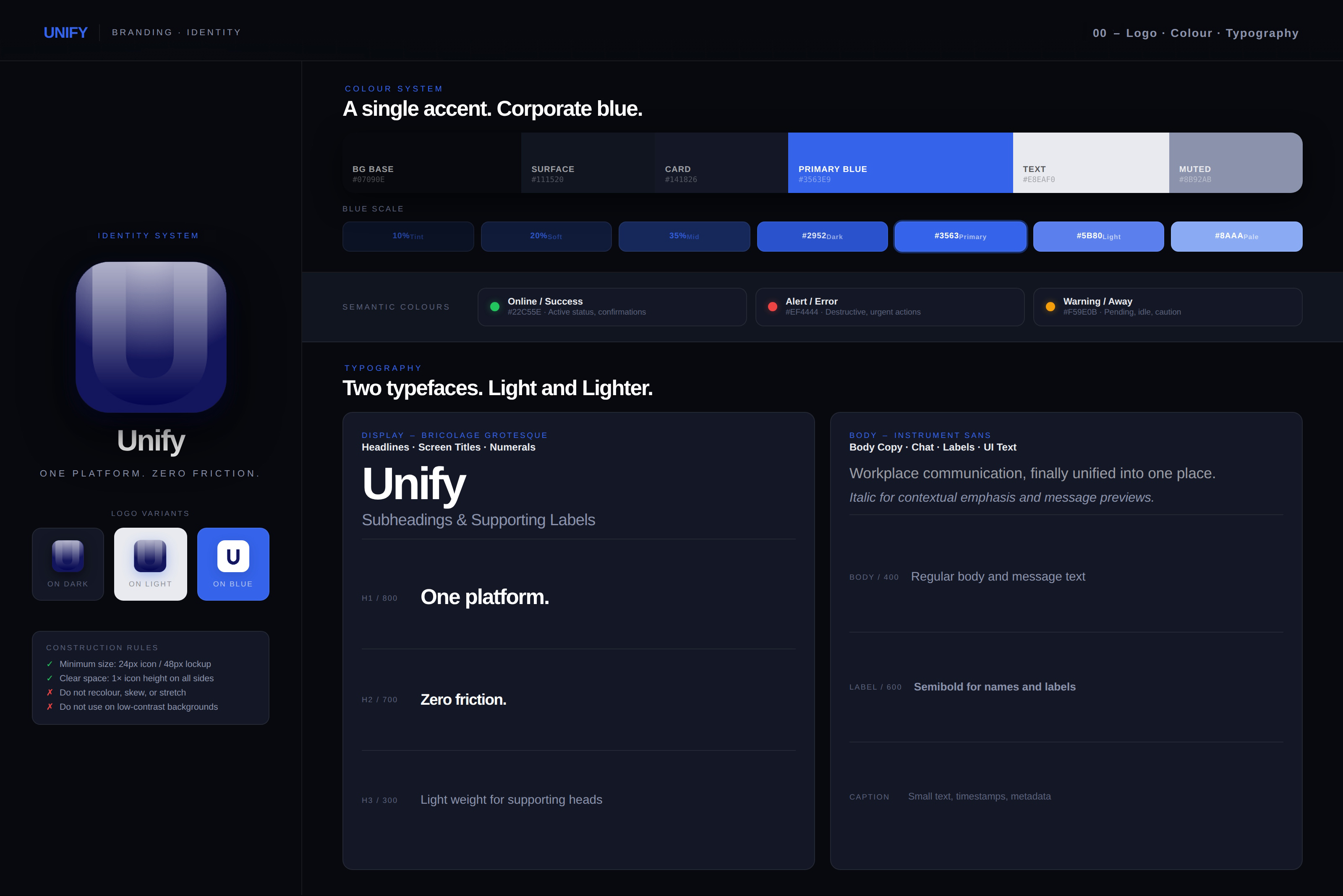
Unify — Design System
🎨
Screen 00

Design System

assets/projects/unify/screens/00-design-system.jpg · 6000 × 4001 px
00 Design System
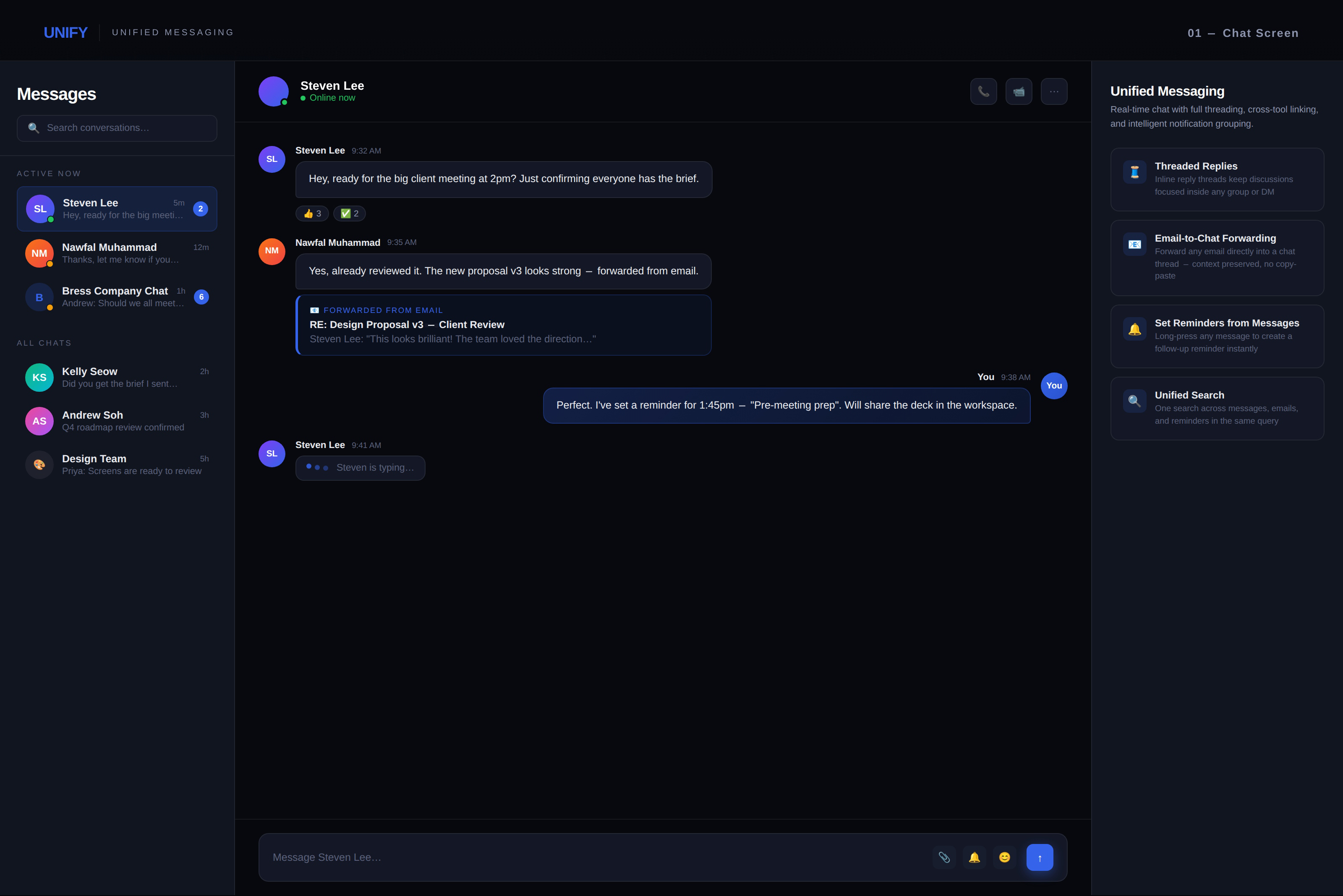
Unify — Chat Screen
💬
Screen 01

Unified Chat

assets/projects/unify/screens/01-chat.jpg · 6000 × 4001 px
01 Unified Chat
Unify — Email Inbox
✉
Screen 02

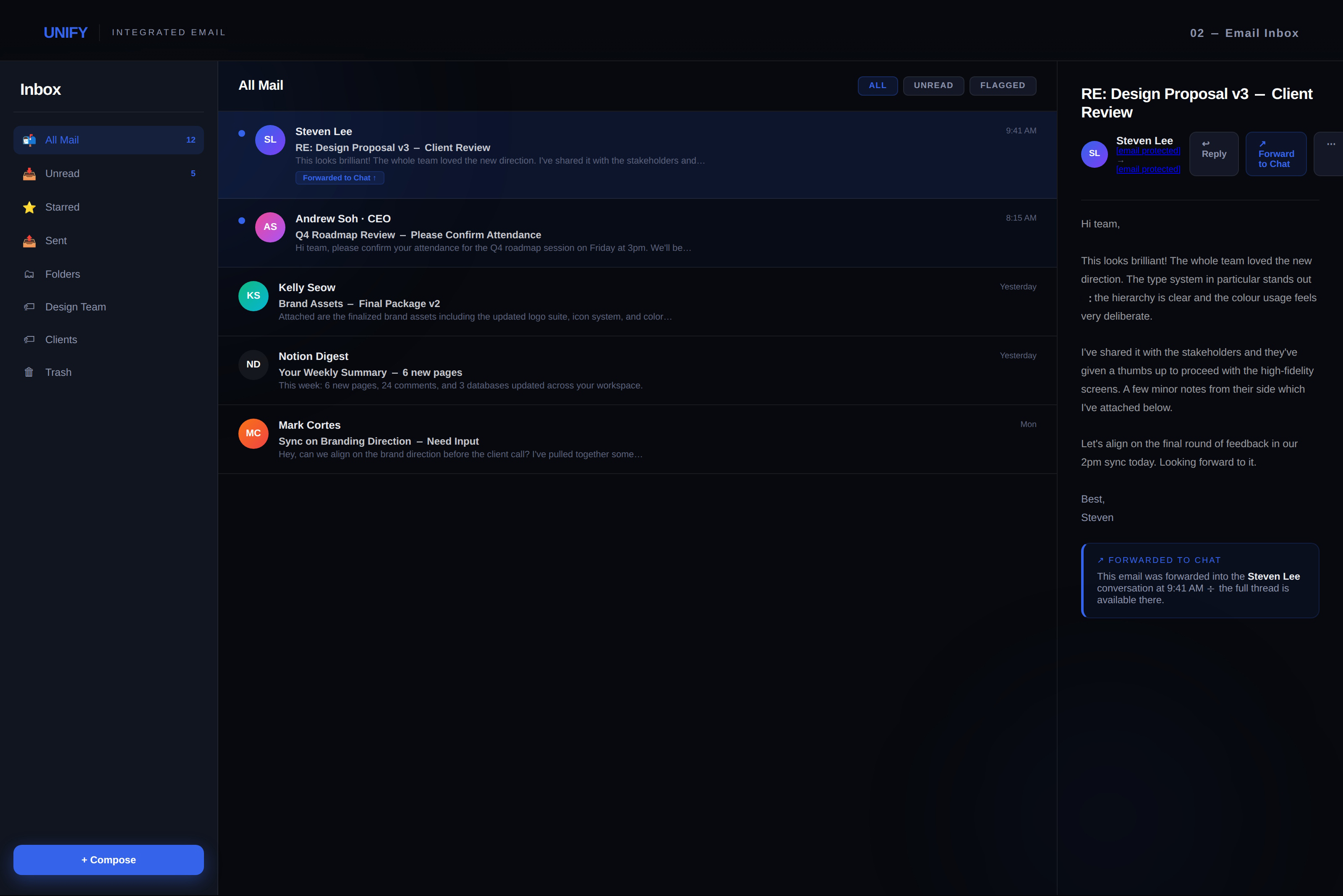
Email Inbox

assets/projects/unify/screens/02-inbox.jpg · 6000 × 4001 px
02 Email Inbox
Unify — Reminders
🔔
Screen 03

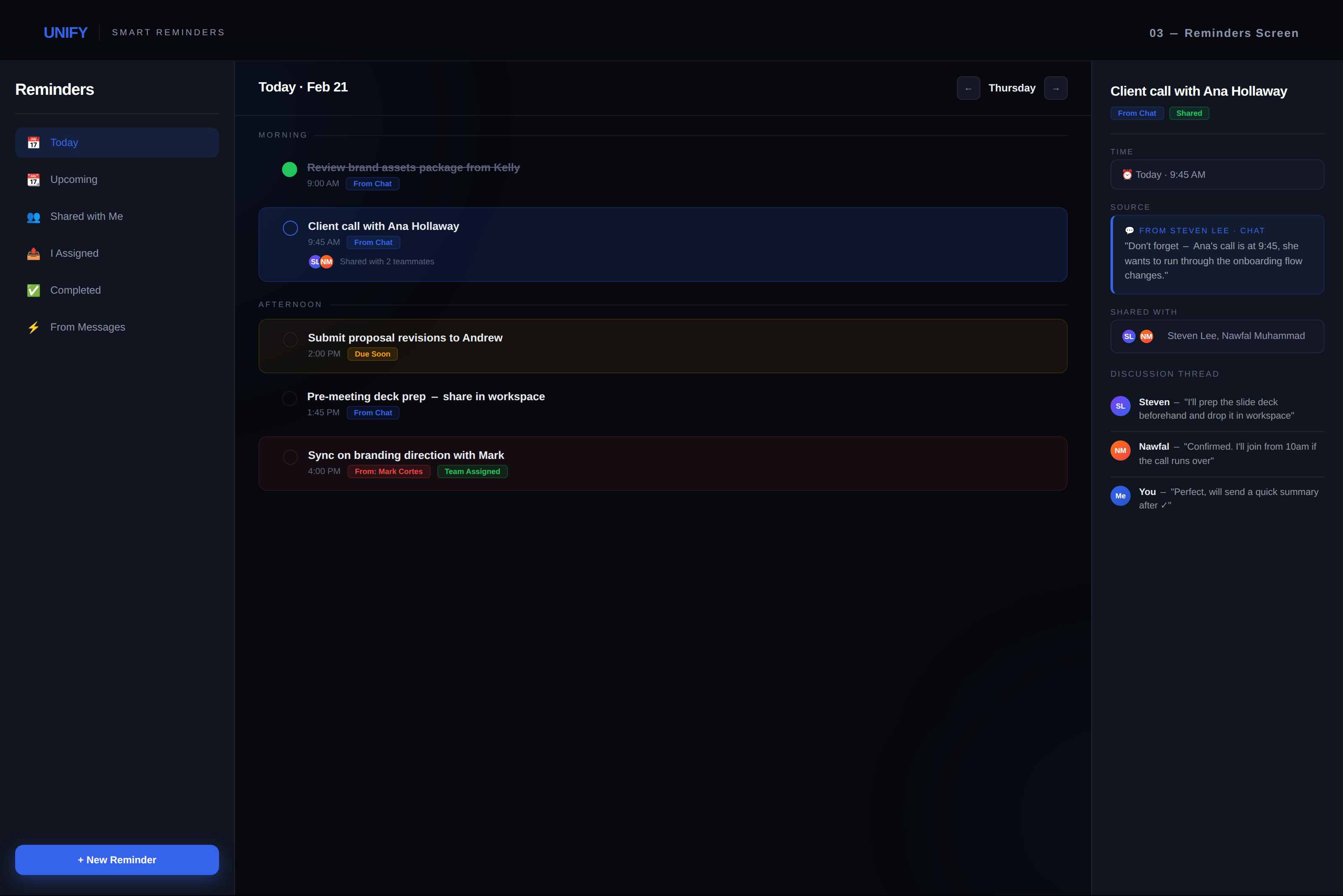
Smart Reminders

assets/projects/unify/screens/03-reminders.jpg · 6000 × 4001 px
03 Smart Reminders
Unify — Profile & Org
🏢
Screen 04

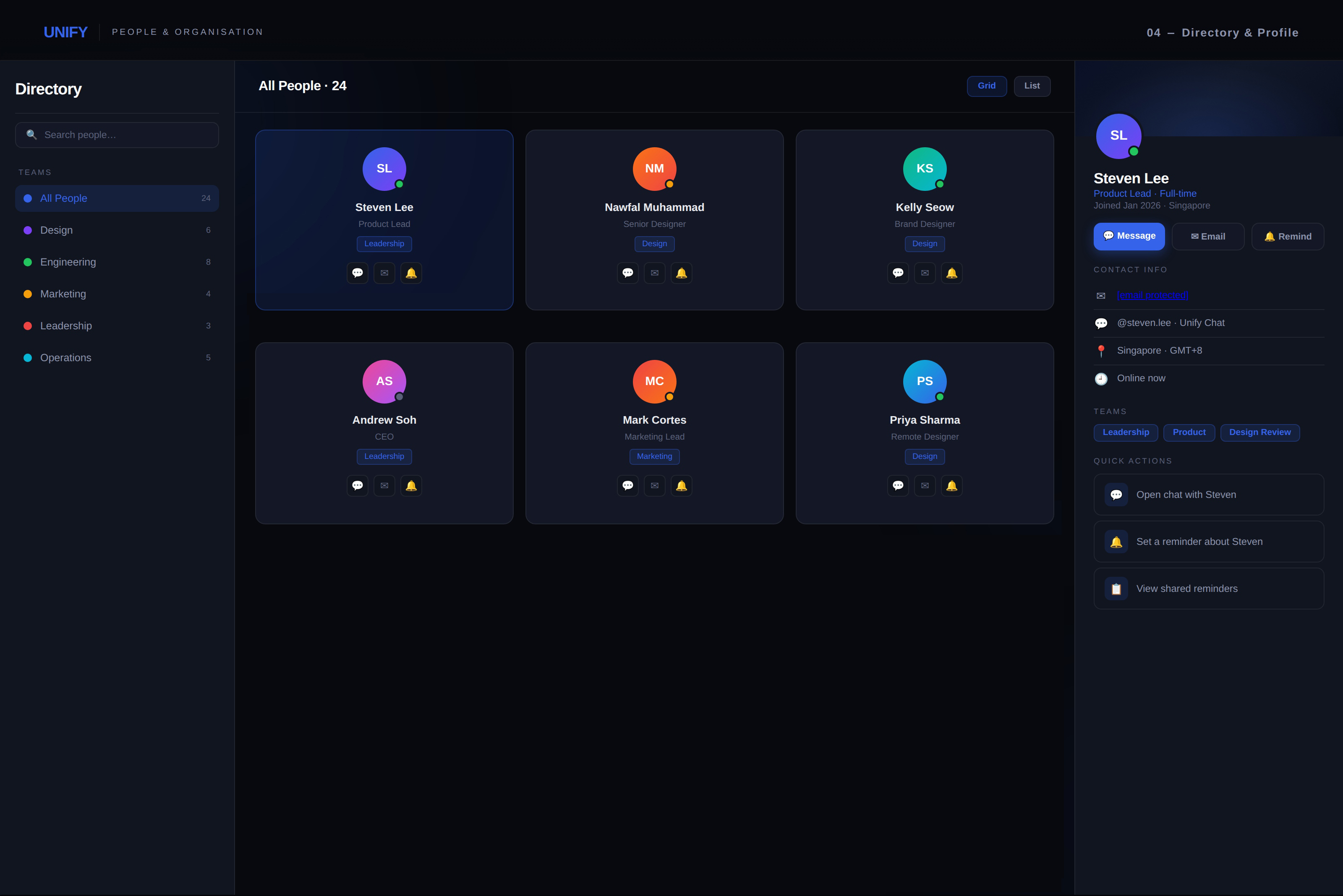
People & Org

assets/projects/unify/screens/04-profile.jpg · 6000 × 4001 px
04 People & Org
Unify — Mobile App
📱
Screen 05

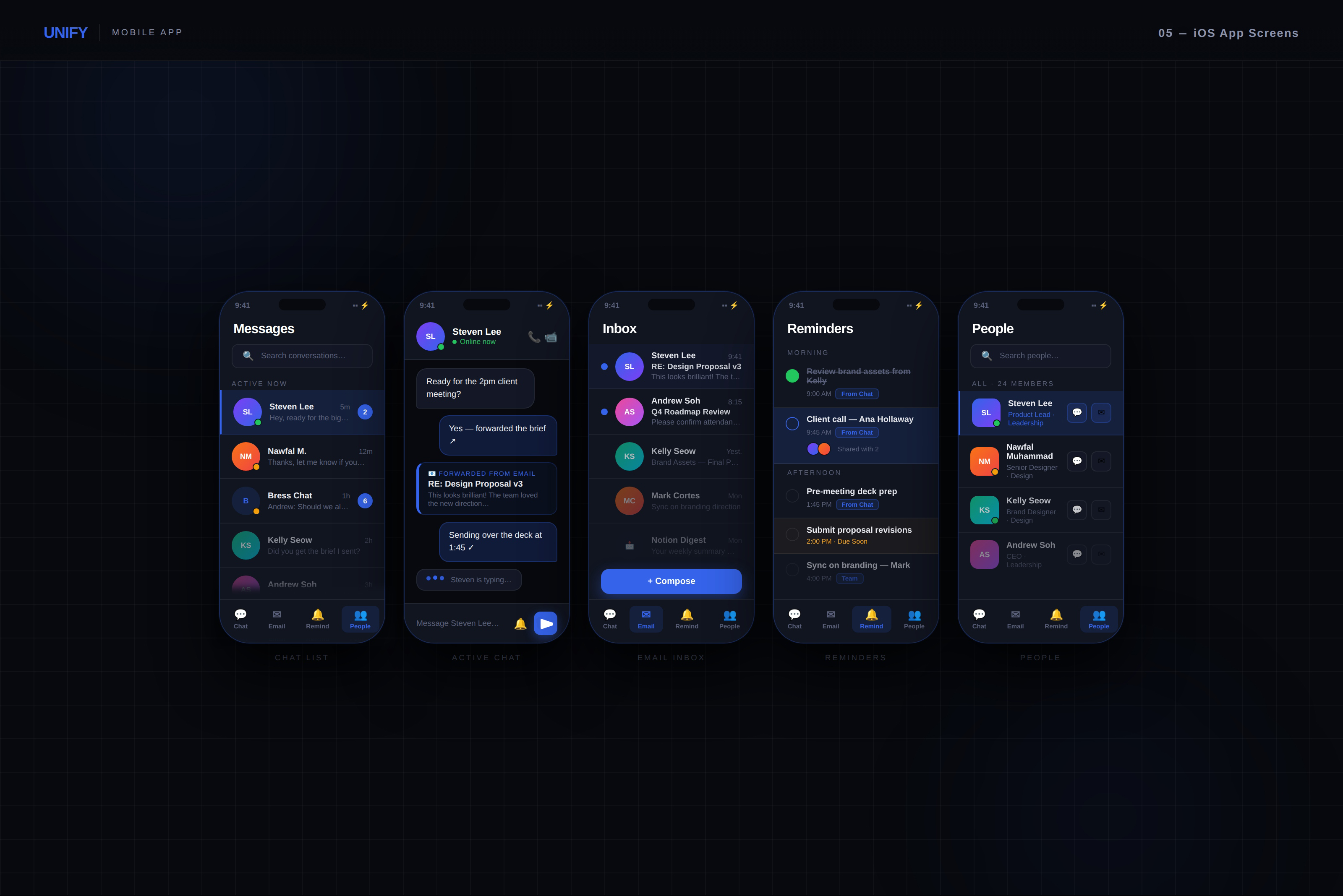
Mobile App

assets/projects/unify/screens/05-mobile.jpg · 6000 × 4001 px

05 Mobile App
Ideation - Roadmap

What ships first,
what comes next

A prioritized split between the MVP core and extended vision.

MVP: Core Release

Ship First
💬Direct messaging and group chats with threading
✉Integrated email client with inbox management
🔁Email to chat forwarding
🔔Personal and shared reminders
📋Company directory and basic team groupings
🔒Admin controls for roles and visibility permissions
🔍Unified search across messages and emails

Extended Vision

Next Phases
🤖AI-assisted reply suggestions based on context and history
📊Communication analytics dashboard
🧵Reminder threads with full discussion capability
🗓Calendar integration and reminder triggers
🔌Third-party integrations: Notion, Linear, GitHub, Jira
📱Desktop client with persistent sidebar
🧪Usability testing iteration cycles
References

Sources & Citations

01
2024 State of Business Communication
Grammarly & Harris Poll, 2024. Source of the 88% workweek communication figure and the 84% multi-channel figure. Survey of 1,002 knowledge workers and 253 business leaders across the US.
grammarly.com/business ↗
02
The Productivity Shift — 2025 Annual Report
Grammarly, 2025. Source of the $9,284 per worker annual cost of poor communication figure. Surveys thousands of workers and business leaders, analysing tens of thousands of data points on communication and productivity.
grammarly.com/business ↗
03
The State of Workplace Communication — 2025
ClickUp, 2025. Supporting data on fragmented communication landscapes and the finding that 83% of knowledge workers rely on email and chat, scattering information across disconnected channels.
clickup.com ↗
04
2025 State of Internal Communication Report
Axios HQ, 2025. Supporting context for the cost of ineffective communication, citing $3,640–$54,860 per employee annually depending on seniority. Senior employees lose 63 work days per year to ineffective communication.
axioshq.com ↗

Statistics used in this case study reflect published research at the time of the project(2025). All figures are cited to their primary source. This is a UI/UX design project | Unify is a conceptual product and not a commercial offering. Yet?...